
Formcrafts - a form and survey platform for Salesforce, HubSpot, etc
  1. Templates
    1. All templates illustration
      All templates
    2. Application forms illustration
      Application forms
    3. Calculation forms illustration
      Calculation forms
    4. Lead generation forms illustration
      Lead generation forms
    5. Customer service illustration
      Customer service
    6. Evaluation forms illustration
      Evaluation forms
    7. Survey and feedback illustration
      Survey and feedback
    8. Operations forms illustration
      Operations forms
    9. Payment forms illustration
      Payment forms
    10. Booking and registration illustration
      Booking and registration
    11. Salesforce forms illustration
      Salesforce forms
    12. Other forms illustration
      Other forms
  2. Features
    1. 18 Form Fields illustration
      18 Form Fields
    2. 19 Integrations illustration
      19 Integrations
    3. Conditional Logic illustration
      Conditional Logic
    4. Multi-step Forms illustration
      Multi-step Forms
    5. Calculations illustration
      Calculations
    6. Partial Submissions illustration
      Partial Submissions
    7. Save & Resume illustration
      Save & Resume
    8. Payments illustration
      Payments
    9. Hidden Fields illustration
      Hidden Fields
    10. Engagement analysis illustration
      Engagement analysis
    11. Dynamic Dropdowns illustration
      Dynamic Dropdowns
    12. Dynamic Checkboxes illustration
      Dynamic Checkboxes
    13. Dynamic Tables illustration
      Dynamic Tables
    14. Multilingual forms illustration
      Multilingual forms
  3. Pricing
  4. Help
  5. Login
  6. Signup
    →
  • Help index
  • Features
    • Conditional logic
    • Prefill forms
    • Multi-step forms
    • Calculations
    • Partial submissions
    • Field references
    • Save and resume
    • Hidden fields
    • Dynamic lookup
    • Dynamic tables
    • Dynamic multiple choice
    • Dynamic dropdowns
    • Workflows
    • Multilingual forms
    • Privacy mode
    • Success message
    • Form redirect
    • GA/GTM
    • Accept payments
    • Linked forms
    • Disable form
  • Styling
    • Custom CSS
    • Custom fonts
    • Color scheme
    • Form background
  • Analytics
    • Test mode
    • Overview
    • Field analytics
    • Form engagement
  • Workflows
    • Send emails
    • Form redirect
    • Success message
    • Webhooks
    • Create PDF
    • ActiveCampaign
    • Asana
    • Mailchimp
    • Front app
    • Freshdesk
    • Google Sheets
    • Pipedrive
    • Linear
    • Klaviyo
  • Sharing
    • Custom form link
    • Embed on a page (inline)
    • Embed on a page (popup)
    • Embed in emails
    • Embed on WordPress
    • Embed on Shopify
    • Embed on Squarespace
  • Salesforce
    • Overview
    • Create records
    • Create multiple records
    • Update records
    • Related records
    • Dynamic picklists
    • Dynamic checkboxes
    • Dynamic tables
    • Attach files
    • Create PDFs
    • Form prefill
    • Experience Cloud Embed
    • Record Page Embed
  • HubSpot
    • Overview
    • Create contact form
    • Create lead capture form
    • Create customer survey
    • Prefill HubSpot form
    • Embed on HubSpot page
    • Uninstall
  • Zendesk
    • Create ticket form
    • Create CSAT survey
    • Embed on Help Center
    • Prefill ticket form
  • Admin
    • Users
    • Custom domain
    • Custom email domain
    • Vanity subdomain
    • Subscription
  • Developers
    • Embed Library
    • API keys
    • API v1
    • API v2
  • Others
    • Partner program
    • GDPR compliance
    • Workflow logs
    • White labeling
    • Using JSONPath
    • Form speed
    • Zapier
    • Entity Change Notice
  • Contact
  1. Help
  2. ›
    Features
  3. ›
    Dynamic multiple choice

Dynamic Multiple Choice

On this page
  1. Introduction
  2. Remote URL
  3. Google Sheets
  4. Salesforce
  5. Notes
    1. Allow multiple selections
    2. Randomize options

Introduction

Options for a multiple choice field are generally static and defined in the form builder. However, there are cases where you want to fetch the options from a remote source dynamically — for example, to keep choices in sync with your database, CRM, or spreadsheet without editing the form each time.

Here is an example. The first field allows you to pick a category, and the second field allows you to pick an item from that category. The options in the second field are fetched dynamically based on the selection in the first field. All data resides in a Google Sheets spreadsheet.
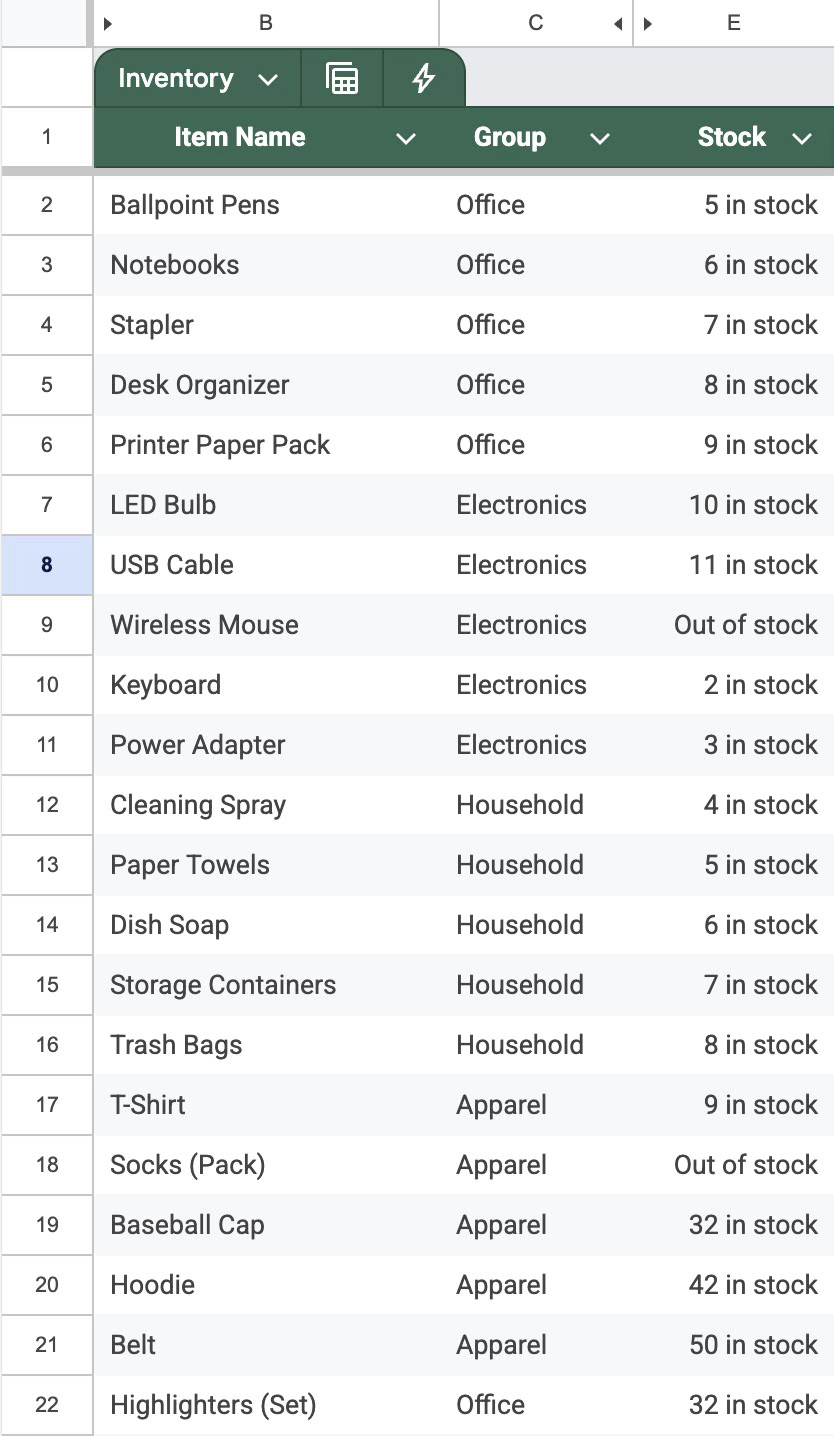
Screenshot of adding a hidden form field in Formcrafts editor for source tracking and user segmentation.

When editing a multiple choice field go to the Options tab. Click on Source to see the list of available sources (the default being List):

The following sources are available: Remote URL, Google Sheets, and Salesforce.

Remote URL

Fetch table data from any external API endpoint that returns JSON data. This is the most flexible option for integrating with third-party services.

Configuration options:

  • Remote URL: Endpoint to fetch data from (supports dynamic parameters so you can reference other form fields using the @ key)
  • Authorization header (Optional) Bearer token or Basic auth
  • Option List Path: JSONPath expression to extract the array of data objects
  • Column mapping: Map table columns to fields in the returned data

Test configuration

  • Remote URL: https://api.formcrafts.com/public/options?type=inventory
  • Option List Path: $.data[*]
  • Column mapping: $.label and $.value

The Remote URL mode sends a POST request to your endpoint with the current form values, allowing you to return dynamic data based on user input.

Learn more about JSONPath syntax →

Google Sheets

Fetch table data from a Google Sheets spreadsheet.

Configuration options:

  • Spreadsheet file: Select your Google Sheets file
  • Sheet: Select the specific sheet within the spreadsheet
  • Filter rules: Use form field values to filter rows from the sheet
  • Column mapping: Map table columns to spreadsheet columns

Note that filter rules can reference other form fields. For example, if you have a form field labelled Country, you can set a filter rule to only show rows where the “Country” column matches the value of field Country. Whenever the user changes the value of the Country field, the options in the multiple choice will update accordingly.

Salesforce

Fetch options from Salesforce using an object query, a SOQL query, or a picklist field. This works the same way as dynamic picklists, with the same column mappings:

  • Label (required)
  • Value (optional)
  • Description (optional)
  • Image (optional)

Please read the Salesforce dynamic picklists documentation for full details on sources and SOQL queries.

Notes

Allow multiple selections

Dynamic multiple choice supports the Allow multiple selections setting. When enabled, users can pick more than one option. You can also set a minimum and maximum number of selections.

Randomize options

The Randomize options setting works with dynamic sources. Options fetched from a remote source will be displayed in a random order each time the form loads.

Minimal, fast, and powerful. Try now.
Formcrafts - a form and survey platform for Salesforce, HubSpot, etc

Bodhweb GmbH,
Moltkestraße 105,
40479 Düsseldorf

Salesforce AppExchange partner logo HubSpot app partner logo
Templates
Application formsLead generation formsSurvey & feedback formsEvaluation formsSupport request formsBooking & registrationContact forms
Comparisons
vs AllFormAssemblyTypeformJotformWufooSurveyMonkey
Features
Conditional logicSalesforce formsHubSpot formsZendesk ticket formsEmail formsIntegrationsForm fields
Resources
Help centerBlogDeveloper APIGDPRStatusReport abuseContact us
Company
About usNonprofitCase studiesSecurityTerms and privacyImpressum